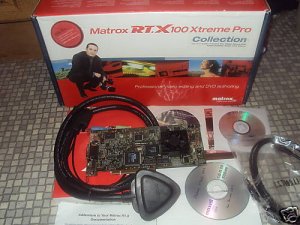
Am throwing in a DVD for Adobe Premiere pro Training
another DVD containing the following
ADOBE TMPRO
AFTER EFFECT
Adobe Encore DVD
HEROGLYPH 2.0
matrox fx
FOTOPLUGIN
INFOCHANNEL
PREMIERE
TITLEDEKO PRO V1.1 FOR PREMIERE
STARGLOW
and many more.. that make your creatIvity glow ALIVE
With Matrox RT.X100 Xtreme Pro, you edit with full-resolution, full-quality video in real time with unequalled responsiveness, even on a P4 2.4 GHz machine with 512 MB RAM. You always see your edits simultaneously on the VGA and video monitors, without the need to connect a DV device. There is no need to render your realtime projects before you print to analog or DV tape or encode MPEG-2 streams for DVD authoring.
Superior realtime 3D effects
The right realtime 3D engine, in the hands of a professional video editor, can add significant production value to any project. Elegant 3D effects on titles and graphics, as well as on video, can even provide the extra edge that lets producers compete effectively for those all-important eyeballs.
Adobe Premiere Pro 1.5 provides a few 3D picture-in-picture effects with limited control parameters.
With Matrox RT.X100 Xtreme Pro, you can easily bring movement and life to your images. Video, titles, and graphics actually become true 3D objects that you can animate in 3D space in real time with complete keyframe control over many parameters such as borders, shadows, lighting, radius, angle, softness, etc.
Sought-after realtime filters and color tools
Adobe Premiere Pro 1.5 offers a basic selection of filters. Matrox RT.X100 Xtreme Pro takes it to the next level with many sought-after realtime filters and effects such as pan & scan, old movie, soft focus, color match, super-smooth field-blended fast and slow motion, and advanced chroma keying with 4:4:4 upsampling.
Realtime analog and DV capture and print-to-tape
With Adobe Premiere Pro 1.5 you need an analog and/or 1394 capture card to get video into and out of your computer. You will need to render your projects before you can record them to tape.
With Matrox RT.X100 Xtreme Pro, for not much more than the price of the software alone, you get realtime (no-render) DV-1394, S-video and composite I/O, plus faster, better capture tools.
Realtime MPEG-2 capture and encoding
With Adobe Premiere Pro 1.5 you cannot capture directly in MPEG-2 from 1394. You must first capture a DV file to disk, drag it to a timeline, and then export the timeline to MPEG-2. To create an MPEG-2 stream from a project you are editing, you would first render it (in DV format) to see the final finished product and then export it to MPEG-2. This two-step transcoding process takes time and degrades quality.
With Matrox RT.X100 Xtreme Pro you can capture directly from analog or 1394 to an MPEG-2 file in real time. You can also encode your realtime projects straight to MPEG-2 from the timeline without rendering.
Faster, more versatile capture and export tools
Matrox RT.X100 Xtreme Pro includes a variety of productivity tools for capture and export.
Matrox SinglePass technology cuts capture time dramatically by automatically scanning, logging, and batch capturing DV clips in a single pass, as the tape plays, without stopping or cueing. This not only saves time but also eliminates repetitive rewind and pre-roll to save wear and tear on camcorders, VTRs, and tapes.
Single-frame capture lets you easily create photomontages.
When capturing analog footage, Matrox RT.X100 Xtreme Pro gives you control over hue, saturation, contrast and brightness, complete with vectorscope and waveform monitors.
Matrox MediaExport provides hardware-accelerated simultaneous batch encoding of Windows Media/RealMedia streaming formats and MPEG-1/MPEG-2 formats with multiple resolutions, bit rates, and frame rates.
--------------------------------------------------------------------------------
Matrox RT.X100 Specifications
Inputs:
FireWire 1394 6-pin
composite video (CVBS), RCA jack
S-video (Y/C), mini-DIN
NTSC, PAL, and SECAM
Outputs:
FireWire 1394 6-pin
composite video (CVBS), RCA jack
S-video (Y/C), mini-DIN
NTSC,PAL, and SECAM
Video Formats:
ITU-R601
NTSC: 720 x 480 at 29.97 frames/sec
PAL/SECAM: 720 x 576 at 25 frames/sec
4:3 and 16:9 aspect ratios
Video Overlay: Video-in-a-window support on console
Video Codec:
Capture
DV, DVCAM
NTSC 4:1:1
PAL 4:2:0
Playback
DV, DVCAM
NTSC 4:1:1
PAL 4:2:0
Export
DV, DVCAM
NTSC 4:1:1
PAL 4:2:0
MPEG-2@ML IBP from 2 to 10 Mbps
Audio Features
Sampling method: 16 bit, 48 kHz
Analog audio I/O: dependent on audio card